


Propertyware Accounts Payable: How to Track Vendor Bills and Payments

Vendor bills can become difficult to manage when a property management company handles multiple properties, maintenance contractors, utility providers, and recurring service agreements. A plumbing invoice may be assigned to the wrong property, a vendor payment may be recorded twice, or a bill may remain outstanding even after the payment has cleared the bank. These issues can create inaccurate expense reports and leave property managers unsure how much cash is actually available.
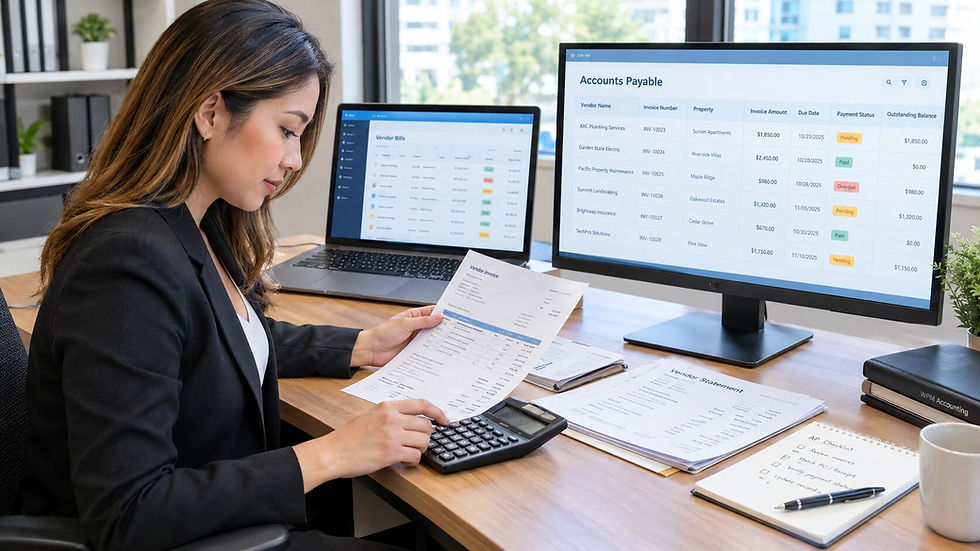
Propertyware accounts payable helps property managers organize vendor bills and payment records within their property management accounting workflow. However, using the software does not automatically prevent accounting errors. Bills still need to be reviewed, assigned to the correct property and expense category, recorded with accurate dates, and matched against payments.
A reliable process connects vendor invoices, payment approvals, bank reconciliation, and owner reporting. When these steps work together, property managers can pay vendors on time, maintain clear financial records, and provide owners with more dependable statements. Understanding where errors occur and how to correct them is essential for keeping accounts payable under control.
What Is Propertyware Accounts Payable and How Does It Help Property Managers?
Propertyware accounts payable refers to the process of recording, organizing, and tracking amounts a property management company owes to vendors and service providers. These obligations may include maintenance invoices, landscaping contracts, utility bills, insurance expenses, cleaning services, and other property related costs.
Propertyware provides accounting functionality that supports property level financial tracking. Property managers can use its available bill and payment workflows to maintain records of vendor obligations, document expenses, and monitor whether bills have been paid. The exact steps depend on the company's configuration, permissions, and accounting procedures.
The main benefit is visibility. Instead of relying on scattered emails, spreadsheets, and paper invoices, a property manager can maintain a more consistent record of what the company owes, which property incurred the expense, and whether payment has been completed.
Consider a manager overseeing 25 rental properties. A roofing contractor submits a $2,400 invoice for repairs at one property, while a landscaping company submits a recurring $650 bill for several properties. If the invoices are entered without proper property assignments, expenses may appear under the wrong owner or property. The affected owner statements could show costs that belong elsewhere, even when the total company expense is correct.
A well managed accounts payable process helps prevent these problems by connecting each bill to its supporting documentation, correct property, expense category, and payment record. It also supports more reliable cash planning because managers can see upcoming obligations before funds are committed elsewhere.

How Can Property Managers Organize Vendor Bills in Propertyware?
Effective Propertyware vendor bill tracking begins before a payment is made. Every invoice should be reviewed, verified, and recorded consistently so that the accounting records reflect the actual obligation.
Start by checking the vendor name, invoice number, invoice date, due date, amount, and description of the work or service. Compare the invoice with the approved work order, service agreement, purchase authorization, or other supporting documentation. If the contractor billed for replacing a water heater, for example, confirm that the work was completed and that the amount matches the agreed price.
Next, assign the bill to the correct property and expense account. A repair expense for one rental unit should not be charged to another owner's property simply because both properties use the same contractor. Shared expenses require a documented allocation method so that each property receives its appropriate share.
Expense classification also matters. Routine repairs should generally be distinguished from capital improvements when the applicable accounting rules require different treatment. Replacing a damaged faucet may be a repair expense, while a substantial improvement that extends a building's useful life may require capitalization. The decision depends on the facts and the company's accounting policy, not merely the vendor's invoice description.
Supporting documents should remain accessible with the accounting record whenever the software workflow permits. This gives the team evidence to review when an owner questions a charge, an auditor requests documentation, or a manager needs to verify a previous payment.
A useful control is to establish a consistent bill entry procedure for every property. Require staff to verify the invoice, confirm the property assignment, review the expense category, and check for possible duplicates before approving it for payment. These steps help turn Propertyware vendor bill tracking into a dependable accounting process rather than a simple data entry task.
How Do You Track Propertyware Vendor Payments and Outstanding Bills?
Recording a bill and paying it are separate accounting events. A vendor invoice generally creates an amount payable, while the later payment reduces that obligation and reduces the relevant cash balance. Treating these events separately allows property managers to identify outstanding bills and determine whether recorded payments have actually settled the liabilities.
Begin by reviewing the vendor bill list or applicable accounts payable records for unpaid, partially paid, and overdue invoices. Confirm each bill's due date, approved amount, and payment status. Where the system provides the information, compare the bill with its associated payment transaction to verify that the amount and reference details agree.
When making a payment, confirm that it is assigned to the correct vendor and bank account and that the payment date reflects the actual transaction. If one payment covers several invoices, make sure the correct bills are marked as paid or reduced according to the payment allocation. Do not assume that issuing a check or initiating an electronic transfer means the bank has already processed it.
Bank reconciliation provides another layer of verification. Suppose Propertyware shows that a $1,150 plumbing invoice has been paid, but the bank statement does not show the corresponding withdrawal.
The payment may still be outstanding, may have been entered with an incorrect date, or may have been recorded against the wrong bank account. The manager should investigate the difference before concluding that the accounts payable balance is correct.
For a closer look at how to identify and resolve differences between recorded transactions and bank activity, read WPM Accounting’s published article, Propertyware Bank Reconciliation.
Regular review is especially important before preparing owner statements. A vendor expense may be recorded correctly while its payment remains outstanding, or a payment may clear the bank but fail to update the intended bill properly. Reviewing both the liability and cash recor
ds helps prevent inaccurate reporting and reduces the risk of paying the same invoice twice.

What Propertyware Accounts Payable Mistakes Can Lead to Duplicate Payments and Inaccurate Records?
Accounts payable errors often develop when staff work under time pressure, invoices arrive through several channels, or payment records are not reviewed consistently. The following issues deserve particular attention.
1. Entering the Same Vendor Invoice Twice
Duplicate bills can occur when an invoice arrives by email and is later submitted again through a property manager or maintenance coordinator without checking existing records. This can inflate expenses and liabilities, and may result in the vendor receiving two payments for the same work.
2. Assigning an Expense to the Wrong Property
A team member may select the wrong property when entering a bill, especially when several properties have similar names or use the same contractor. The error can distort property profitability and cause incorrect owner statements that require adjustments and explanations.
3. Recording Payments Against the Wrong Bill
A payment may be applied to a different invoice from the one it was intended to settle, particularly when a vendor has several open bills. The vendor account can then show a misleading outstanding balance, making it difficult to identify which obligation remains unpaid.
4. Using Incorrect Transaction Dates
Staff may enter the invoice date as the payment date or record a transaction in a period different from when it occurred. This can create discrepancies during bank reconciliation and shift expenses or liabilities between reporting periods.
5. Failing to Verify Trust Account Funding
A property management company may record a vendor bill without confirming whether the appropriate property or owner funds are available and whether the payment is permitted under the company's trust accounting procedures. Paying an expense from an inappropriate account can create trust account mismatches, complicate owner fund balances, and increase compliance risk.
6. Overlooking Supporting Documentation
An invoice may be entered and paid without a clear description of the work, an approval record, or evidence that the service was completed. Missing documentation weakens internal controls and makes it harder to resolve owner disputes, investigate questionable charges, or respond to audit requests.
These problems are not always caused by the software. They often result from inconsistent procedures, unclear approval responsibilities, and insufficient review of transactions before payment.
How Can Property Managers Resolve Vendor Bill Discrepancies and Improve Payment Accuracy?
When a vendor balance does not look right, avoid immediately entering an adjustment or marking a bill as paid simply to clear the outstanding amount. First determine whether the problem originated in the invoice, payment allocation, transaction date, property assignment, or bank activity.
Start by comparing the vendor invoice with the bill recorded in Propertyware. Check the invoice number, amount, date, vendor, and property. Then review the associated payment details and supporting documents to establish whether the payment was issued, processed, and applied to the correct obligation.
If the bill appears paid but remains outstanding, investigate whether the payment was recorded against another invoice, entered under a different vendor, or assigned to the wrong bank account. If the bank statement contains a withdrawal that cannot be matched to the expected payment, confirm the transaction date and amount and review the bank reconciliation records.
Next, determine whether the discrepancy affects other accounting records. A bill charged to the wrong property may affect an owner's statement, while a payment posted to the wrong bank account may create a reconciliation difference. If trust funds are involved, verify the applicable account balances and transaction history before making corrections. Trust account issues should be handled carefully because correcting the general ledger alone may not resolve the underlying fund allocation problem.
Once the cause is established, correct the original transaction using the appropriate process for your accounting setup and permission level. Preserve the supporting documentation and record why the correction was made. Then review the affected vendor balance, property expense report, owner statement, and bank reconciliation to confirm that the correction resolved the discrepancy without creating another one.
Following a consistent Propertyware accounting best practice means investigating the source of an error, correcting the underlying record, and verifying the result. This is more reliable than using unexplained adjustments to force a balance to agree.
When Should Property Managers Seek Professional Propertyware Accounts Payable Support?
Some accounts payable issues are straightforward, such as correcting a property assignment before a bill is paid. Others require a broader review of vendor balances, bank transactions, trust accounting, expense allocation, and owner reporting. When discrepancies continue despite routine checks, professional accounting support can help identify the underlying cause.
Consider seeking help when vendor balances repeatedly fail to match payment records, bank reconciliations contain unexplained differences, owner statements show inconsistent expenses, or trust account balances do not agree with the supporting records. Support may also be useful when migrating historical transactions, cleaning up a backlog of unpaid bills, or establishing consistent procedures across a growing portfolio.
WPM Accounting helps property managers and real estate professionals address property management accounting challenges, improve transaction accuracy, and maintain clearer financial records. Its propertyware property management accounting services can be a starting point for discussing accounting workflows, cleanup needs, and ongoing support.
The objective is not simply to clear a list of unpaid invoices. It is to ensure each expense belongs to the correct property, each payment settles the intended obligation, and the resulting financial reports accurately reflect the company's activity. A well documented accounts payable process makes it easier to explain expenses to owners, plan cash requirements, and investigate problems before they spread across the accounting records.
Conclusion: Keep Propertyware Vendor Bills Accurate From Entry to Payment
Reliable Propertyware accounts payable depends on more than entering invoices and recording payments. Property managers need a repeatable process that connects invoice verification, property allocation, payment approval, bank reconciliation, and owner reporting. A mistake in any one of these steps can create duplicate payments, misleading vendor balances, trust account discrepancies, or incorrect owner statements.
Use these practical steps to strengthen your process:
Verify every invoice before entry. Check the vendor, invoice number, amount, due date, and supporting work documentation.
Assign expenses to the correct property and account. Review shared expenses and distinguish repairs from improvements when accounting rules require it.
Review unpaid bills regularly. Identify overdue obligations and confirm whether payments have been initiated, processed, or incorrectly applied.
Check for duplicate invoices and payments. Search existing vendor records before entering a new bill or issuing payment.
Reconcile payments against bank activity. Investigate missing withdrawals, incorrect dates, and payments assigned to the wrong account.
Protect trust accounting records. Verify available funds and appropriate account allocation before paying property related expenses.
Investigate discrepancies before adjusting balances. Correct the original transaction, preserve documentation, and verify the affected reports afterward.
If vendor balances, payment records, or owner statements continue to produce unexplained differences, professional review may help identify errors that routine processing overlooks. Contact WPM Accounting to discuss your Propertyware accounts payable workflow and determine how to improve the accuracy and consistency of your property financial records.

Frequently Asked Questions About Propertyware Accounts Payable and Vendor Payments
How do you track vendor bills in Propertyware?
Record each invoice with the correct vendor, property, expense category, amount, and due date, then retain the supporting documentation. Review unpaid bills regularly and compare invoice details with payment records before closing the accounting period.
How do you record Propertyware vendor payments?
Use the appropriate payment workflow in your Propertyware setup, making sure the payment is assigned to the correct vendor, bill, bank account, and transaction date. Then verify the payment status and reconcile the transaction against bank activity.
Why is a vendor bill missing or showing an incorrect balance in Propertyware?
The bill may not have been entered, may be assigned to another vendor or property, or may have an incorrectly applied payment. Review the original invoice, bill record, payment history, and transaction dates to identify the source of the discrepancy.
How can property managers prevent duplicate vendor payments in Propertyware?
Check existing vendor records before entering an invoice, and compare invoice numbers, amounts, and dates to identify possible duplicates. A documented approval process and regular review of outstanding bills can reduce the risk of paying the same invoice twice.
Can professional accounting services help manage Propertyware accounts payable?
Yes. An experienced property management accounting professional can review vendor balances, investigate payment discrepancies, improve expense coding, and strengthen reconciliation procedures. This support can also help identify problems affecting trust accounts and owner statements.


Comments